Bets
The Bets section is your live feed of everything players are betting on. Open the Bets menu in the sidebar and you'll see three pages:
- Bets list — every single bet, as it happens
- Freebets — the Free Bet bonuses that have been handed out
- Bet insurance — the Bet Insurance bonuses that have been handed out
If a player gets in touch asking about a specific bet, this is where you start.
Bets list
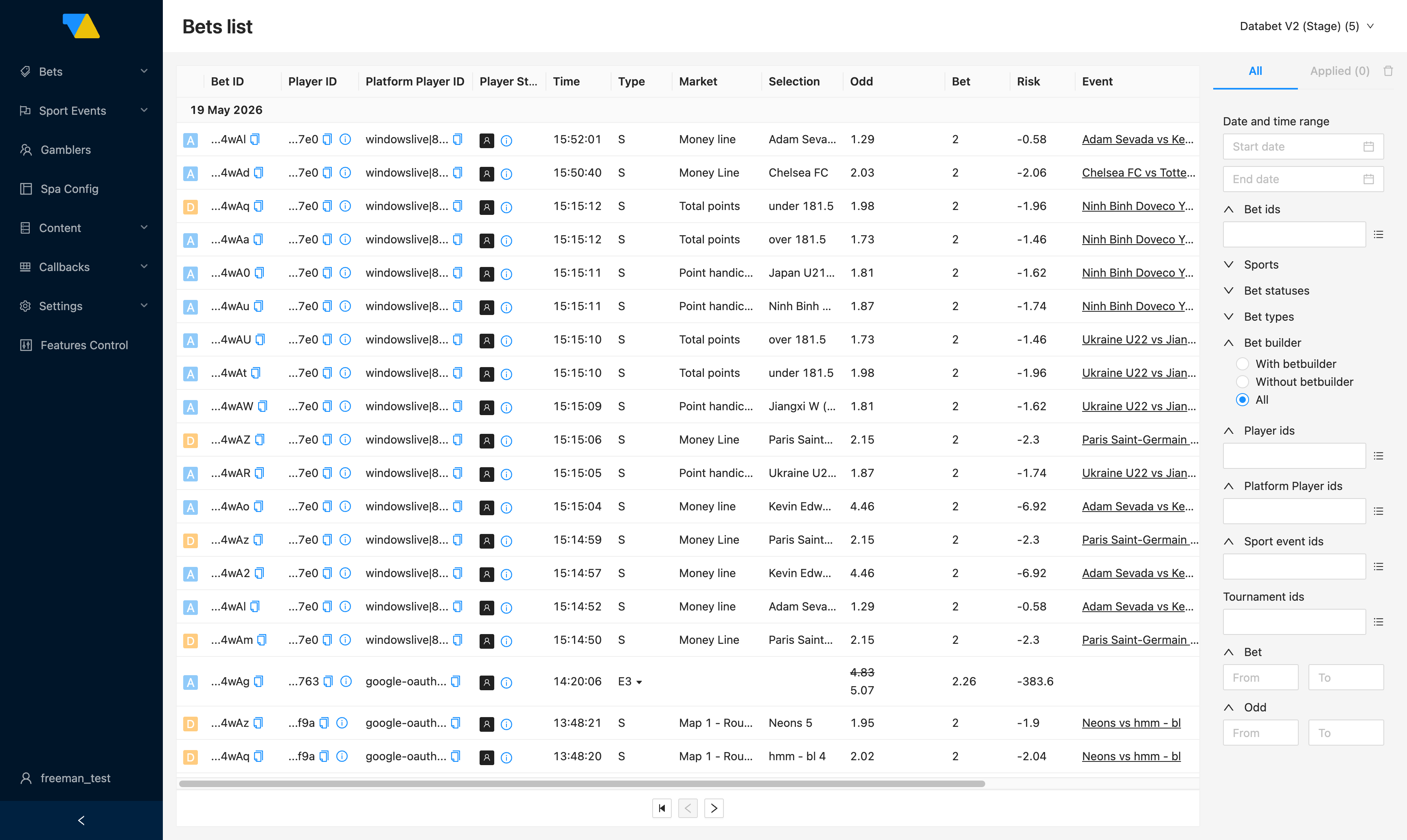
This is the main page in the section. Every bet that comes in from your sportsbook lands here, newest at the top.
Reading a row
Each row is one bet. Reading left to right:
- Bet status badge at the start of the row (
A,D,P,F, …) shows the current state of the bet itself:A= Accepted,D= Declined,P= Place error,F= Force decline, and so on. For the full set of states and how a bet moves between them, see the Bet lifecycle — the badge is the first-letter abbreviation of theBetStatuslisted there. - Bet ID and Player ID — long unique codes. The small Copy icon next to each one copies the full code to your clipboard, handy when you want to paste it into a filter or share with support.
- Player ID vs Platform Player ID — the first is the DATA.BET-side ID; the second is the ID your own platform assigned to that player. When a support tool gives you an ID, paste it into whichever filter matches. See the Glossary.
- The small
i(info-circle) icon next to the player ID opens a popover with extended player info. - Time — when the bet was placed.
- Type —
Sis a single,E<n>is an express (accumulator) withnselections (e.g.E3= 3 legs),Sy<n>/<m>is a system bet. See the Glossary for fuller definitions. - Market and Selection — what the player bet on, e.g. "Money line — Adam Sevada".
- Odd and Bet — the price and the stake.
- Risk — the operator's potential net result if this bet wins. The sign convention here matches the rest of the BO: negative numbers mean you owe the player on a win (the normal case). See Risk and money for the full definition.
- Event — the match name. Click it to jump straight to the Match page.
- Tournament — the competition the match belongs to.
Common things you can do
Open the match a bet is on
Click the event name in the row. You'll land on the Match page, where you can see all the other bets placed on that game and the markets they came from.
Investigate the platform notification
Click the clock icon on the right of the row. This opens Callback history pre-filtered to that bet — useful for confirming whether your platform received our /bet/place and /bet/accept callbacks. Walkthrough: Investigating a missing notification.
Cancel a bet
Click the ✕ icon on the right of the row. The icon only appears on bets that are still cancellable.
What cancelling does
- The stake is returned to the player and a settlement callback is fired to your platform (so your platform can credit the player's balance).
- The action is permanent — you can't un-cancel from the Betting BO.
- Already-settled bets cannot be cancelled (no icon).
- Coordinate with your trading team if you're unsure why a bet looks suspicious — cancelling a legitimate bet creates a customer-service problem.
See how the odds changed
Click the small bar-chart icon (rightmost icon in the row, after the clock) to see how the price evolved from the moment the player picked it to when the bet was confirmed.
Finding a specific bet
The panel on the right of the page is the filter panel. Click into a section to expand it, set a value, and the list updates automatically. The most useful filters:
- Date and time range — narrow to the window when the bet was placed
- Bet ids / Player ids / Platform Player ids — paste in the IDs you already have (note the Player ID vs Platform Player ID distinction above)
- Sports — focus on one sport (or a group like all Esports)
- Bet statuses — accepted, declined, placed, settled, etc.
- Bet types — singles, expresses, or systems
- Bet builder —
With betbuilder/Without betbuilder/All. Filters to bets that combine multiple legs on the same match into one combined-odds bet - Bet (From / To) and Odd (From / To) — find unusually large stakes or long-shot odds
The All tab shows every available filter; the Applied tab shows just the ones you've turned on. The trash icon clears everything at once.
Freebets
A Free Bet lets a player place one bet without spending any of their own money — typically a marketing reward. The Freebets page (sidebar: Bets → Freebets) lists every Free Bet that's been issued.
Each row shows who got the Free Bet, how much it's worth, when it was issued, and whether it's still unused or has already been spent. If the Free Bet has been used, you'll also see the Bet ID the player used it on — click through to see the actual bet.
Use the filter panel on the right to narrow down by date, player, or status.
Typical question this page answers: "Did the player ever actually use the bonus I sent them?"
Issuing Free Bets
Free Bets are issued by your platform or marketing system, not from the Betting BO directly. This page shows the result, not the source.
Bet insurance
Bet Insurance is a safety net — if a player loses an insured bet, they get a partial refund of their stake. For example, a player stakes 100, insures it, loses, and you give them back 10.
The Bet insurance page (sidebar: Bets → Bet insurance) lists every insurance record. You can see who it was issued to, the amount and currency, whether it's still active or has been used, and the bet it was applied to. Hover over Foreign params to reveal the insurance ID assigned by your Platform BO (it's tucked behind a hover to keep the row compact; nothing prevents you from copying it).
The filter panel works the same way as on the Freebets page.
Refund amounts are set elsewhere
The refund value (e.g. "10 back on a 100 loss") is set by your platform or marketing system when the insurance is issued. The Betting BO only displays it — you cannot change it from this page.
Typical question this page answers: "Did the insurance refund actually trigger when the player's bet lost?"