Callbacks
Every time something important happens to a bet — it's placed, accepted, declined, settled, cashed out — DATA.BET sends an HTTP request to your platform so it can react. Those messages are called callbacks, and the Callbacks section is your audit trail of what we sent and what your platform said back.
You'll spend time here mostly when something doesn't line up: a bet shows in the Betting BO but not on your platform, or a player complains a settlement never arrived. The pages are:
- Callback sender — what's queued up to go out next
- Callback history — the full log of what's already been sent
- Integration Test — utilities used mostly during initial integration
Jump from a bet to its callbacks
Most of the time you don't need to filter by hand. From a row in the Bets list, click the clock icon — it takes you straight to the callback history pre-filtered to that bet's Group ID.
These pages are read-only
You can search, expand, and copy IDs, but you can't force a retry, change a destination, or cancel a queued callback from the BO. If you need any of those, contact your integration manager with the relevant Bet ID.
Callback sender
This page shows callbacks that are queued up but haven't been delivered yet — either scheduled for later, or pending another retry after a previous failure.
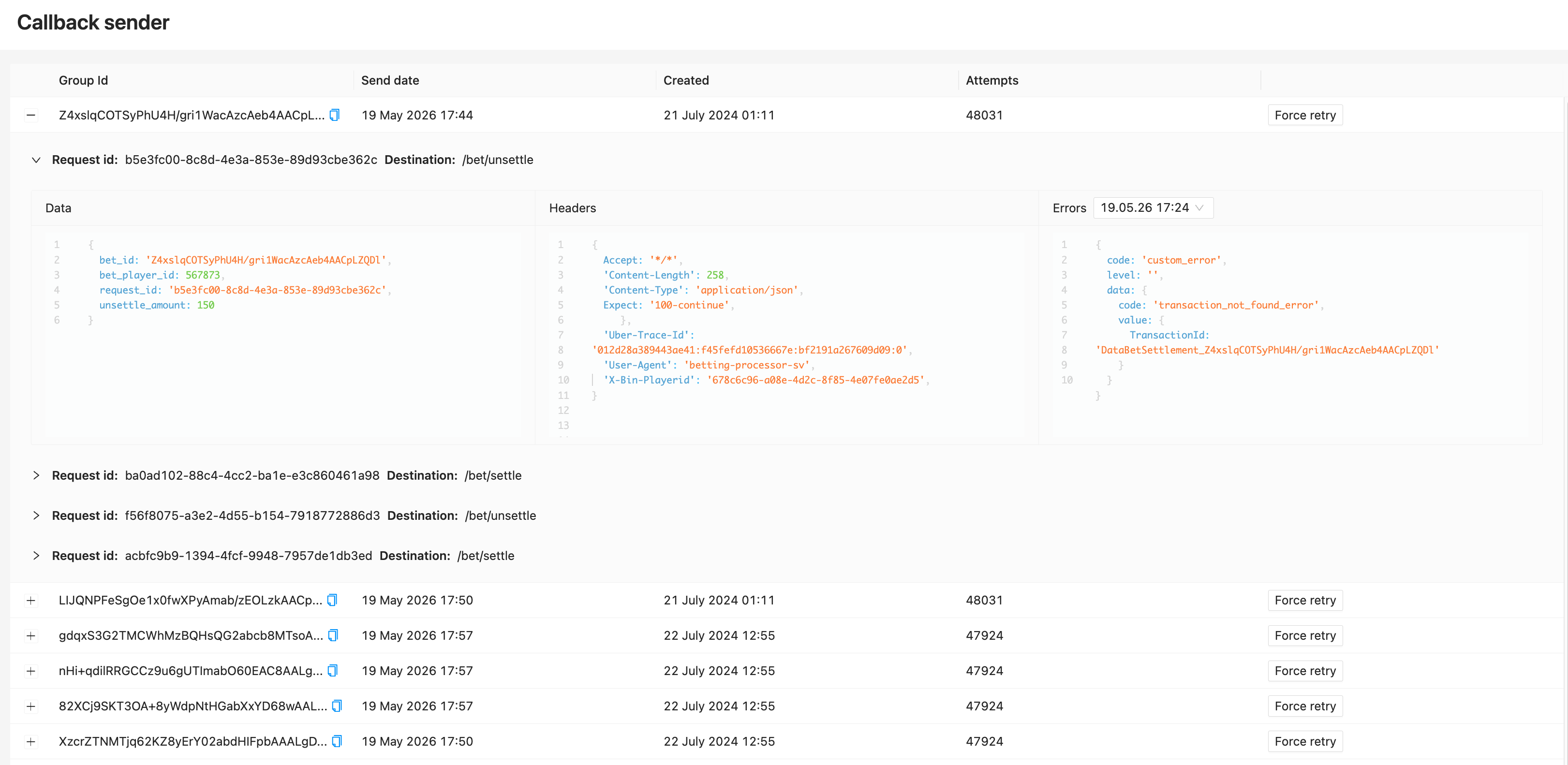
Each row shows:
| Column | Meaning |
|---|---|
| Group Id | The Bet ID these callbacks belong to (copyable). One group = one bet's worth of callbacks |
| Send date | When we'll try (or try next) |
| Created | When the callback group was first created in DATA.BET's system |
| Attempts | How many tries we've already made |
If you see No data, the queue is empty — everything we've tried to send has been delivered (or has reached its retry limit and moved to history).
Use the Group ids filter on the right (paste in the Bet ID) to track a specific bet.
Retry policy
DATA.BET retries failed deliveries on a back-off schedule and gives up after a maximum number of attempts. The exact schedule and limits depend on your integration contract — ask your integration manager for the values that apply to your setup.
Typical question this page answers: "We retried a delivery to my platform — has it actually been retried yet, and how many times?"
Callback history
This is the audit log of every callback we've ever sent — successes and failures alike.
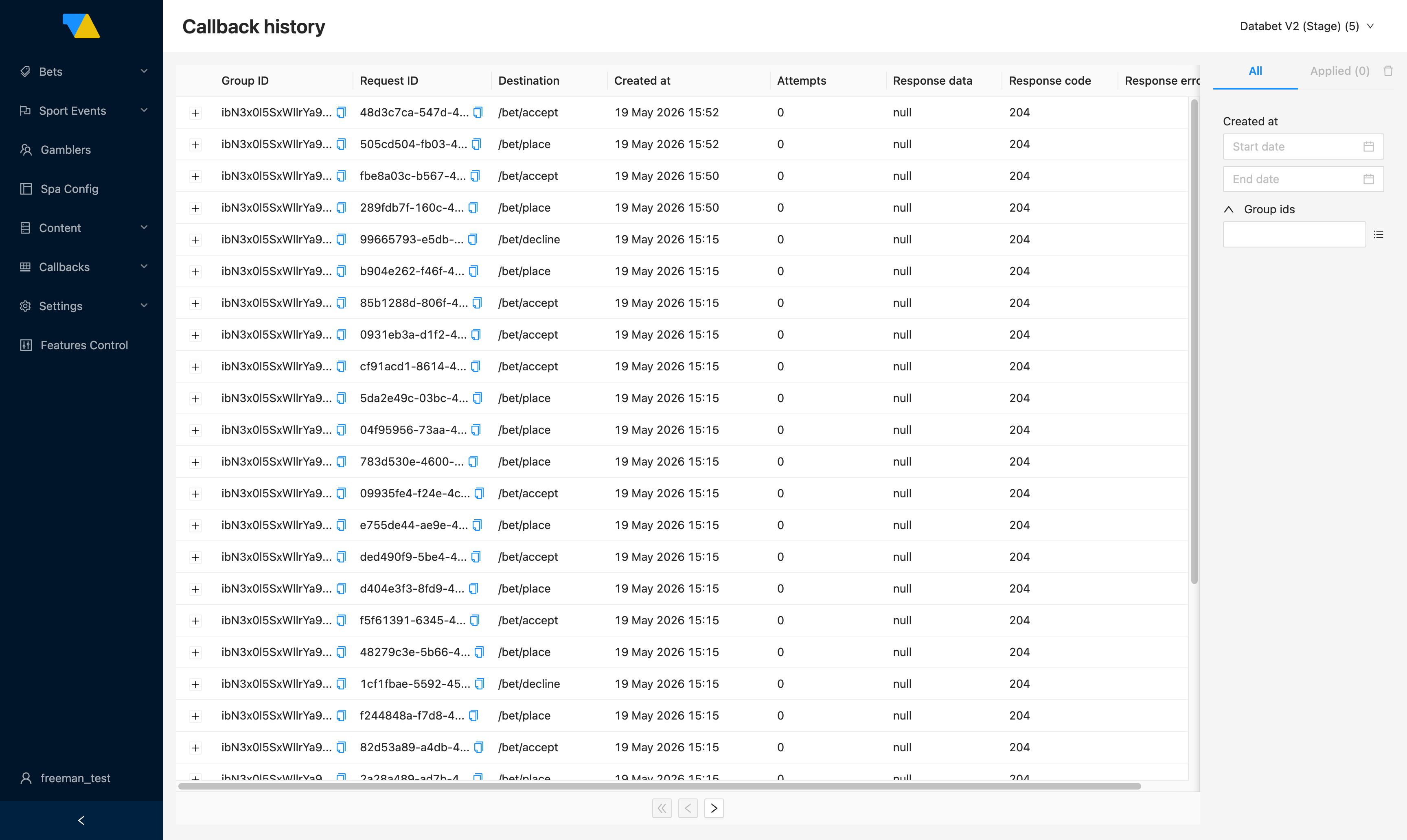
Each row is one HTTP request. Reading the columns:
| Column | Meaning |
|---|---|
| Group ID | The Bet ID these callbacks belong to (copyable). Every callback we send about a bet — /bet/place, /bet/accept, /bet/decline, settlements, cash-outs — shares the same Group ID |
| Request ID | Identifier of this individual HTTP attempt (copyable). Retries of the same callback get new Request IDs |
| Destination | The path on your platform that we hit, e.g. /bet/place, /bet/accept, /bet/decline. The full set is part of your integration contract — see the Callback API reference |
| Created at | When the callback was created in DATA.BET's system (not necessarily when it was first sent — for retried callbacks the row reflects the latest attempt) |
| Attempts | How many times we tried before succeeding or giving up |
| Response data | The body your platform sent back (null if it was empty, which is normal for a 204 response) |
| Response code | HTTP status code your platform returned. DATA.BET treats any 2xx as a success and anything else as a failure to be retried |
| Response error | Error details from your platform, when the request failed |
Click the small arrow on the left of any row to expand it and see the full payload we sent.
Supported vs unsupported errors
When your platform returns a 400 response, the error code in the body tells DATA.BET how to react:
- A supported error is one of the codes listed for the matching endpoint in the Callback API reference. The set differs per endpoint (
/bet/place,/bet/accept, settlements, etc.), so always check the spec for the destination you're investigating rather than assuming a code is supported because it works elsewhere. Returning a supported code is part of the normal contract — for example, the/bet/placecodenot_enough_balancecorrectly tells us the player couldn't cover the stake, and DATA.BET sets the bet toplace_errorwithout retrying further. - An unsupported error is any other code (or a malformed body). This usually means something is wrong on the platform side — a bug, a schema mismatch, or a misconfigured handler. DATA.BET keeps retrying unsupported errors on the back-off schedule until they succeed or hit the retry limit.
If you see unsupported errors in the history, that's the cue to ping your platform engineering team.
How to investigate a missing notification
- Get the Bet ID from the player or the Bets list.
- Open that bet's row in the Bets list and click the clock icon — Callback history opens with that bet's Group ID already in the filter.
- Look at the Response code column:
- All 2xx (200/204/…)? We did our part — the issue is downstream on your platform. Take the Bet ID and Request IDs and escalate to your platform's engineering team with your platform-side logs.
- Any 4xx? Check the error code — see Supported vs unsupported errors. A supported code is normal; an unsupported code points at your platform handlers.
- 5xx? Your platform endpoint errored. Expand the row for the Response error, then check your platform logs.
- No row at all? Switch to Callback sender — the callback may still be queued. If it's not there either, contact your integration manager with the Bet ID.
Filters
The panel on the right lets you narrow the log by:
- Created at — a specific time window
- Group ids — paste in one or more Bet IDs. This is the same identifier the Bets-list shortcut uses
Since Group ID == Bet ID, paste the Bet ID straight into the Group ids filter. Or, even easier, open the bet in the Bets list and click the clock icon — the filter is set for you.
Integration Test
The Integration Test page (sidebar: Callbacks → Integration Test) runs a full battery of synthetic bet scenarios against your platform endpoint and reports whether every callback in the lifecycle behaves as DATA.BET expects. It's the page you live on during initial integration; afterwards, run it again whenever you redeploy your callback handlers.
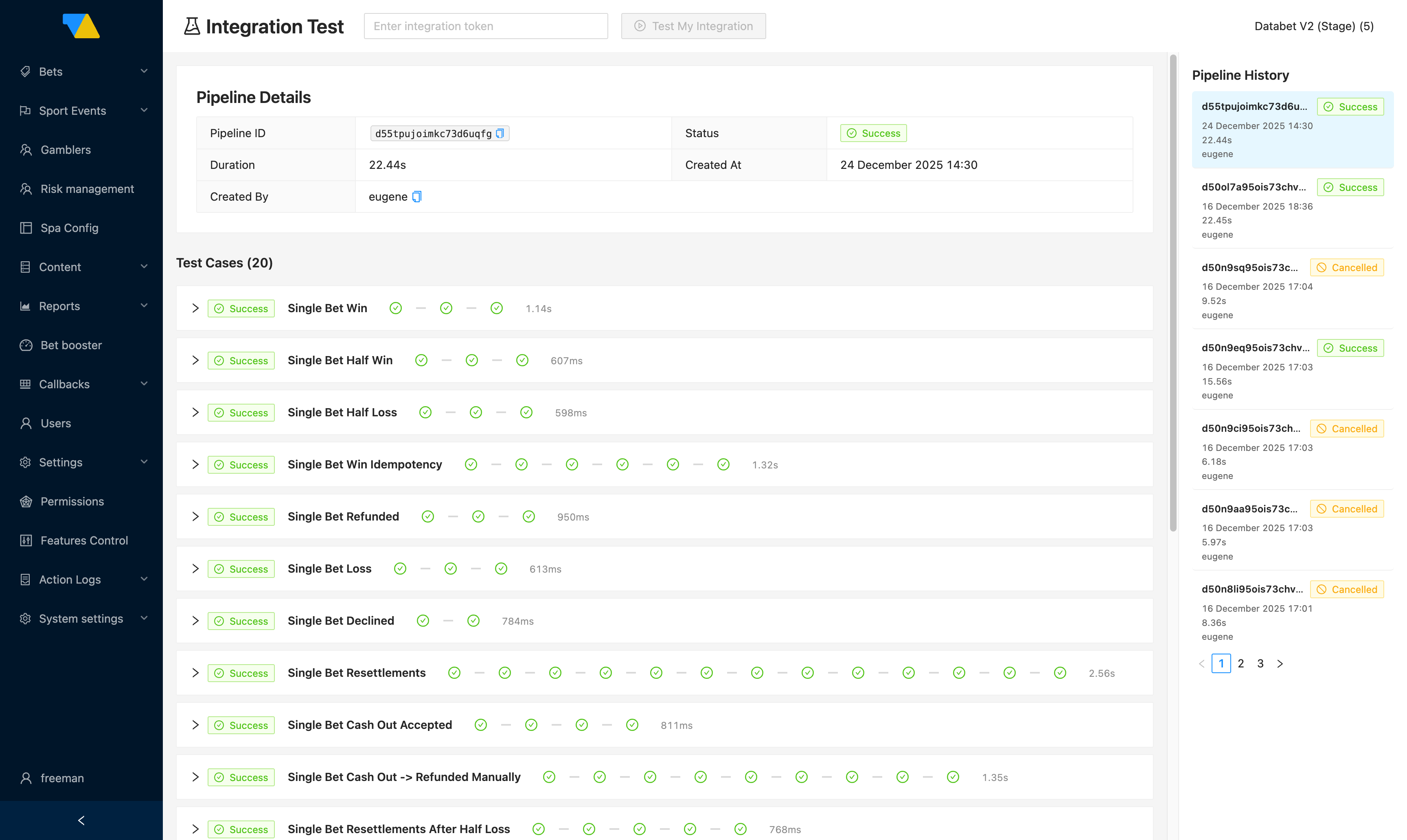
Running a test
- Paste an integration token (an authenticated user's token from your platform) into the field at the top.
- Click Test My Integration.
- The page builds a pipeline — a sequence of 20 test cases covering every important bet path — and runs them in order against your platform.
- Each row in Test Cases shows the case name and a status badge (
Success/Failed). The small ticks across the row are the individual callbacks within the case (place → accept → settle → …).
A pipeline that finishes with Status: Success at the top and a green badge on every test case means your callback integration is sound. Any failed case points at the specific callback that misbehaved — expand the row to see what was sent and what your platform returned.
What the pipeline covers
The 20 cases exercise the full bet lifecycle:
- Single bets — win, loss, half-win, half-loss, refund, decline, idempotency, resettlement
- Combo bets (expresses) — resettlement, partial refund, cash out → manual refund
- System bets — resettlement, partial refund, partial loss
- Cash out flow — accepted, refunded-manually
- Held-money invariants — held funds can't be reused; unsettling releases the hold
Pipeline history
The right-hand panel shows every previous pipeline run for this brand with its status, duration, and the user who triggered it. Click any past entry to load its details — useful when you need to compare a "before vs after" run around a deployment.
Tip
A typical successful run takes about 20–25 seconds end-to-end. If something hangs much longer or finishes immediately with Cancelled, your callback endpoint is likely unreachable or slow.