IP Whitelist
The IP Whitelist is a per-whitelabel allowlist of client IP addresses that are permitted to access the Betting API. It's enforced on top of OAuth 2.0 by the betting public service: a request that authenticates fine but comes from an IP that isn't on your list is rejected with HTTP 403 Forbidden.
You manage the list yourself through the Betting Backoffice — no developer or integration-manager involvement is required for day-to-day changes.
Where to find it
Open Features Control (the WhiteLabel settings page) in the sidebar. The Allowed IPs section lists every entry currently allowed for your brand.
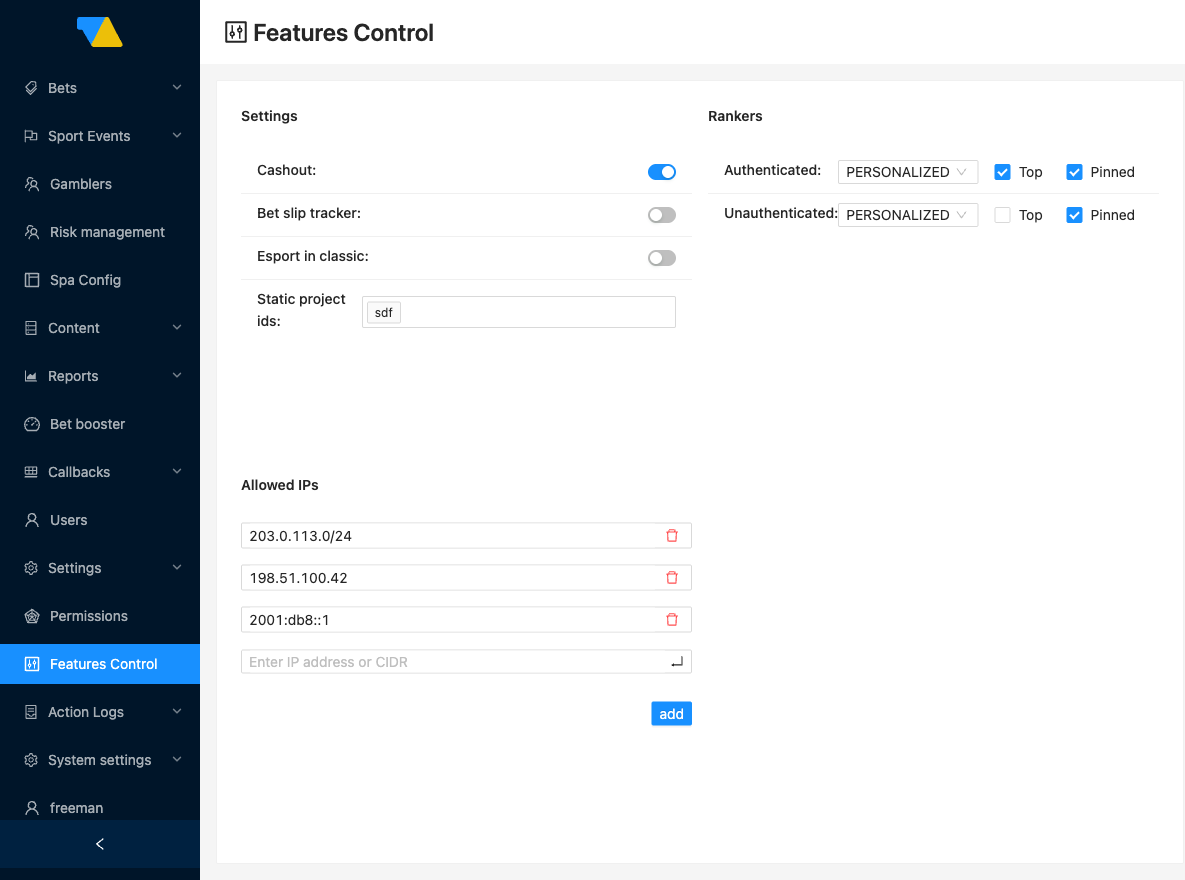
Each entry is a single IPv4 or IPv6 address, optionally written as a CIDR range (e.g. 203.0.113.10, 2001:db8::1, or 203.0.113.0/24).
Managing entries
The list is edited inline:
- Add — enter an IPv4 or IPv6 address (with an optional
/prefixfor a CIDR range) and confirm. The entry appears in the list immediately. - Edit — change an existing entry in place, for example, to widen a single address into a CIDR range.
- Remove — delete an entry you no longer need.
Changes take effect within the cache window
The betting public service caches the allowlist, so any changes you save here propagate within roughly 1 minute. If a newly added IP still gets a 403, give it a moment and retry before investigating anything else.
Special cases
Empty list = blocked
Enforcement is on, and an empty Allowed IPs list means everything is blocked — every external request to your brand gets a 403. It does not mean "no restriction". Always keep at least one entry with your brand's real client IPs.
What clients see when blocked
A request from an IP that isn't allowed receives HTTP 403 Forbidden. If a client reports unexpected 403s, check that their outbound IPs are present and correct in the Allowed IPs section, and remember the ~1-minute cache window after any change.