Match
The Match views answer the question "what's going on with this specific game?" — every market, every odd, and every bet placed on it, all in one place.
There are two pages:
- Matches list — the catalogue of every sport event on your sportsbook
- Match detail — the zoom-in on a single match
You'll usually arrive at the Match detail page either by searching from the matches list, or by clicking an event name in the Bets list.
Matches list
Open Sport Events → Matches in the sidebar.
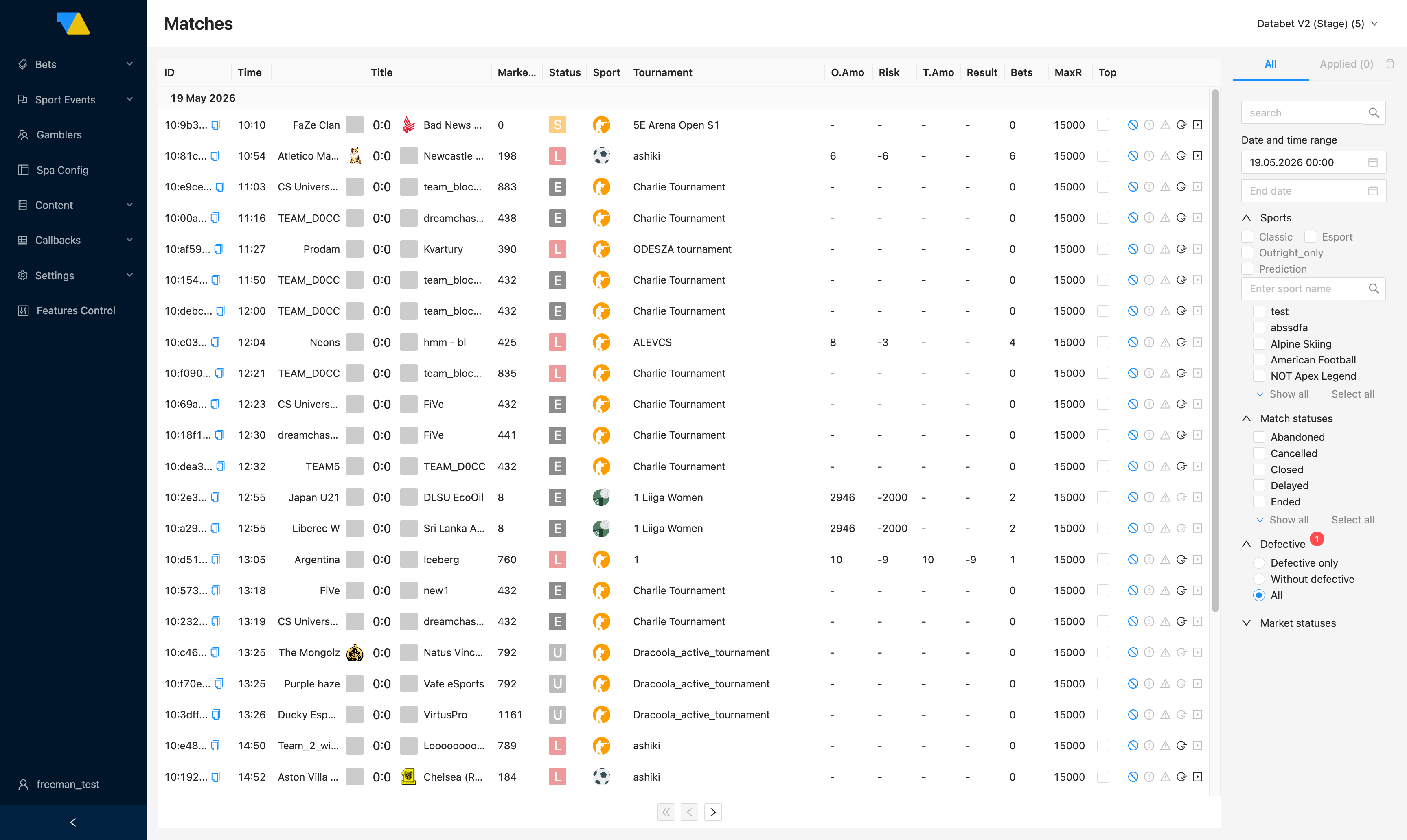
Each row is one match. Reading across the columns:
| Column | Meaning |
|---|---|
| ID | The internal match identifier (copyable) |
| Time | Kickoff time |
| Title | Team names and current score, e.g. FaZe Clan 0:0 Bad News Eagles |
| Markets | Number of betting markets currently open for the match |
| Status | Match lifecycle. The single-letter badge is the first letter of the MatchStatus value: L = Live, S = Suspended, E = Ended, A = Abandoned, C = Cancelled or Closed, D = Delayed, N = Not started, U = Unknown. The filter panel exposes the full set of names |
| Sport / Tournament | The sport and competition |
| O.Amo | Outright Amount — total stakes from outright (long-term) bets on this match. See Glossary |
| Risk | Operator's net risk across the match. Negative = you owe more than you'd keep if outcomes go badly |
| T.Amo | Tournament Amount — stakes placed at the tournament level rather than this specific match |
| Result | Final result once settled |
| Bets | Number of bets placed on the match |
| MaxR | Match-level risk cap — the maximum operator risk allowed on this match. This cap is configured at the platform/trading-team level, not from this page. Contact your integration manager if you need it changed |
| Top | Tick to mark the match as TOP-flagged. Whether this actually pins the match for players depends on the WL-scope Top feature control — see What the Top checkbox does |
Small status icons next to each row reflect lifecycle state (stop, warning, time, play).
What the Top checkbox does
Ticking Top marks the match as TOP-flagged. The same flag can be set by traders from the Trading BO — either source feeds the same field, and the change takes effect immediately.
What happens next depends on the WL-scope Top feature control:
- Top feature control ON — TOP-flagged matches are pinned above the auto-ranked feed for every player. Operators use this when they want a single switch to surface specific matches without managing per-region pin slots. See Manual rankers → Match ordering precedence for how this interacts with Pinned and the auto-ranker.
- Top feature control OFF — the flag is still stored on the match record (and may be consumed by internal trading surfaces or by the legacy
BETTING_TOP_SPORT_EVENTS/BETTING_POPULAR_SPORT_EVENTSbanner providers, which aren't wired through to the SPA today — onlyCMS_BANNER_IDis, see Content → Banners), but ticking it won't change what players see in the sportsbook.
Check the toggle before relying on TOP
Open Features Control in the sidebar to see the current state of the Top toggle. If it's off and you need it on, ask your integration manager. For a per-region pin instead of a blanket flag, use Manual rankers (gated by the separate Pinned toggle).
Finding a match
Use the filter panel on the right:
- Search box at the top — type a team or tournament name
- Date and time range — narrow by kickoff time
- Sports — pick one or several sports
- Match statuses — Abandoned, Cancelled, Closed, Delayed, Ended, Live, and more
- Defective —
Defective only/Without defective/All. A defective match is one flagged as having data-quality issues (e.g. mis-scored, stale prices, feed out of sync with reality). The flag is set by trading operations; if you suspect a match should be defective, coordinate with your trading team rather than guessing - Market statuses — narrow to matches with markets in a given state
Click any row to open that match.
Match detail
This is the page where you can really see what's happening on a single game.
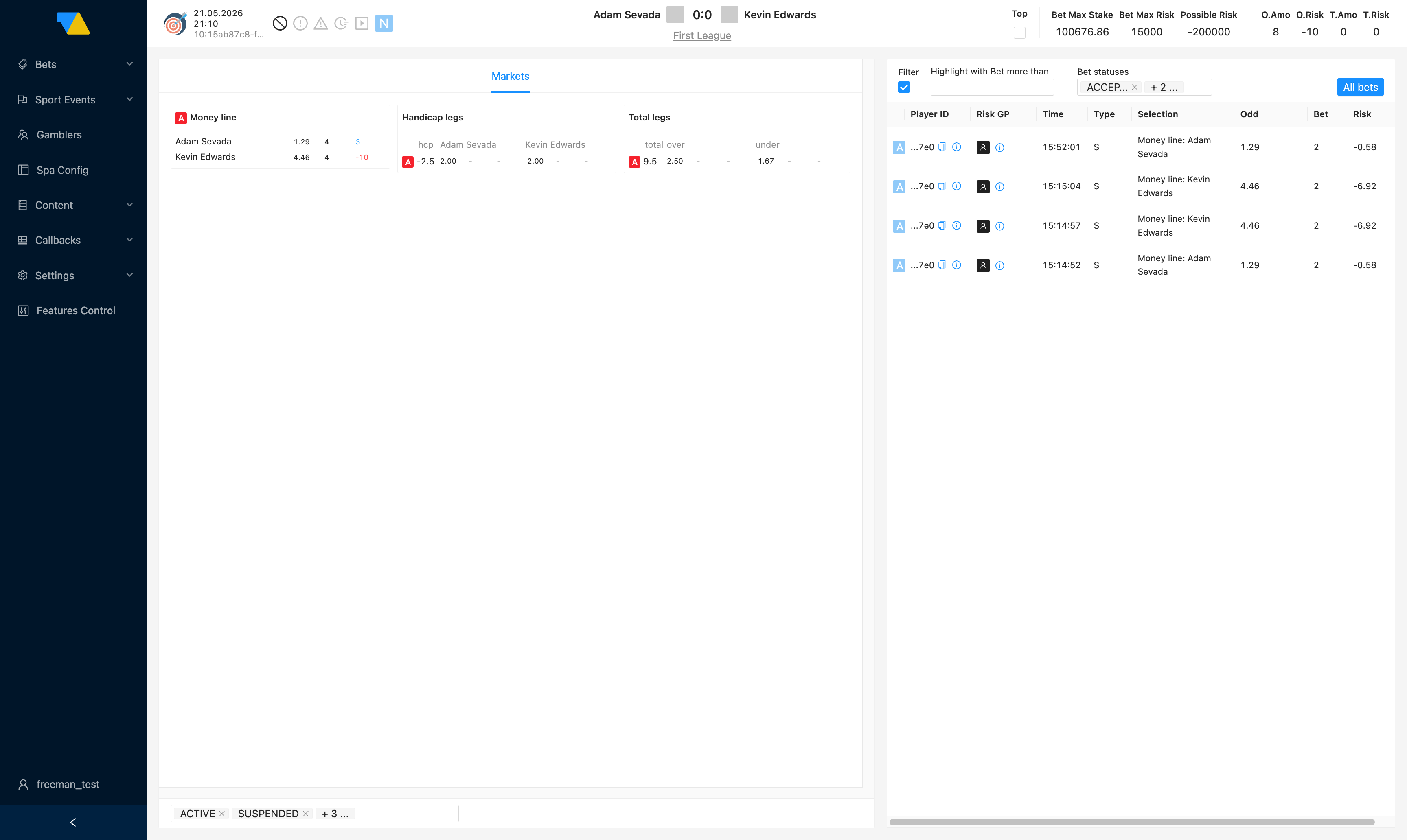
The page has three areas.
1. Header
At the top you'll see the time, the match ID (copyable), the team names with the score, and the status icons. To the right is a summary box:
| Field | Meaning |
|---|---|
| Bet Max Stake | The largest stake DATA.BET will accept on a single bet for this match (a cap, set per match) |
| Bet Max Risk | The largest risk DATA.BET will accept on a single bet for this match (a cap) |
| Possible Risk | The worst-case net result if outcomes fall the wrong way across all currently-active bets on this match |
| O.Amo / O.Risk | Total stake and operator risk from outright (long-term tournament-winner) bets |
| T.Amo / T.Risk | Stake and operator risk from tournament-level bets — typically aggregate bets attributed to the parent tournament rather than this specific match |
The Top checkbox here is the same as on the Matches list. See What the Top checkbox does — whether it surfaces the match to players depends on the WL-scope Top feature control.
Sign convention
Risk values use the same convention as the Bets list: negative = you owe the player on a win. See Glossary → Risk and money.
2. Markets (left side)
Every market open for the match, grouped by family. The exact families depend on the sport — this example shows three common ones, but football, basketball, tennis etc. each have many more (correct score, BTTS, half-time, set winner, etc.):
- Money line — straight winner odds for each side
- Total legs — over/under at various totals
- Handicap legs — spread bets at various handicaps
For the full taxonomy of available market families per sport, check with your integration manager.
Each row shows the market status (A Active, S Suspended, D Deactivated, R Resulted, C Cancelled), the line value, the current odds for each option, and how much money is currently riding on each side.
Filters under the markets
- Market status chips (
ACTIVE,SUSPENDED, …) — multi-select; narrows markets by status. - Highlight with Bet more than — checkbox + number. Lines with bet amounts above the threshold are visually highlighted. Useful for spotting where the money is concentrating.
- Bet statuses — multi-select chips for filtering markets by bet states. Common statuses include
ACCEPTED,PLACED,DECLINED,SETTLED— for the canonical list ask your integration manager.
3. Bets (right side)
Every bet placed on this match. The columns mirror the Bets list:
| Column | Meaning |
|---|---|
| Bet status | Single-letter bet status badge (A Accepted, D Declined, P Place error, F Force decline, …). See the Bet lifecycle for the full set |
| Player ID | Truncated, copyable. The i icon opens an extended player popover |
| Risk GP | The player's risk group — a tag set by your trading team to flag higher- or lower-risk players. Configured at the platform level |
| Time | When the bet was placed |
| Type | S single, E<n> express with n legs, Sy<n>/<m> system |
| Selection | Market and chosen outcome, e.g. Money line: Kevin Edwards |
| Odd | Odds at placement |
| Bet | Stake |
| Risk | Operator's net result if the bet wins (sign convention as above) |
The All bets button at the top of the panel takes you to the full Bets list pre-filtered to this match (URL …/bets/list?sportEventIds[]=<match-id>).
Common things you can do
See who's betting on this game
The bets panel on the right is exactly that. Sort and scan; the filters above narrow things down.
Find the most exposed outcomes
Look at the Risk numbers in the markets panel — the bigger the negative number, the more you'd pay out if that outcome wins. Combine with Highlight with Bet more than to spotlight large bets.
Mark a match as featured
You've got two ways to push a match above the auto-ranked feed, gated by two separate WL-scope feature controls:
- TOP flag (this page's checkbox) — needs the Top feature control enabled. A blanket switch: every TOP-flagged match is pinned above the auto-ranker for every player. Quick to toggle, no per-region setup.
- Manual rankers (Content → Manual rankers) — needs the Pinned feature control enabled. Paste the match ID into a Top slot and set the activation time. Lets you order multiple matches and scope them to specific regions.
When both are enabled, Manual rankers (Pinned) win over the TOP flag, which in turn wins over the auto-ranker (personalized/regional). See Match ordering precedence for the full picture. If neither feature control is on for your WL, ask your integration manager to enable the one you need before relying on either approach.